

Residents of Riderwood Village can subscribe to a number of email groups, available via the RWV.groups.io email domain. Our email groups are hosted on the groups.io platform, along with a lot of other public and private email groups. RWV.groups.io is sponsored by the Riderwood Computer Club, whose volunteers provide administrative support.
Page Contents
Types of Email Groups

Some email groups are simple distribution lists, used only to send out announcements to subscribers. Individual subscribers cannot send emails to these RWV.groups.io distribution lists, nor can they send a reply to the whole group, just to the sender.

Other email groups support group discussions about various topics of interest to the group, where all subscribers can start new topics by sending an email to the group email address. Subscribers can join existing discussions by replying to the group’s email address instead of just the sender’s email address.
Email Groups Available to all Residents
There are currently several email groups available to all Riderwood residents. Please read on to learn about the Email Group Basics before subscribing to any of these email groups.
Chatterwood – An email bulletin board for sharing information about life here at Riderwood Village – see the Chatterwood page for details. To subscribe, send an email to Chatterwood+subscribe@RWV.groups.io.

ChitChat – An email discussion group for general topics of interest to Riderwood residents – see the ChitChat page for details. To subscribe, send an email to ChitChat+subscribe@RWV.groups.io.

Dogs – Information exchange, recommendations, and activities. – see the Dogs In the Family page for details. To subscribe, send an email to Dogs+subscribe@RWV.groups.io.

Hikes – Receive notices about the monthly short hikes – see the Hiking With RWVHikes page for details. To subscribe, send an email to Hikes+subscribe@RWV.groups.io.

RACINFO – A distribution list for the latest information from the RAC – see the Resident Advisory Council page for details. To subscribe, send an email to RACINFO+subscribe@RWV.groups.io.

RSS – A distribution list for the latest information from Residents Supporting Sustainability. See the Residents Supporting Sustainability page for details. To subscribe, send an email to RSS+subscribe@RWV.groups.io.
Several other Riderwood resident clubs and groups also have their own email groups on RWV.groups.io. Visit the group’s RiderwoodLife.com page or contact the group leaders for information about joining their email groups.
Email Group Basics
There are some things you need to understand before you join any RWV.groups.io email group.
How to subscribe
While a group moderator may handle new subscriptions for some email groups, most groups use a
emailgroup+subscribe@RWV.groups.io
email address for new subscribers to initiate their subscription. The process has several distinct steps.

- Your +subscribe email message: While Groups.io does NOT require a Subject or any text in the message, some email tools do – so add a Subject and some text, if required by your tool, and send it off.
- Confirm your subscription request: After you send your email to the group’s +subscribe address, you may get an email from Groups.io with the subject “Confirm Your Groups.io Subscription.” To confirm that you want to join the specified email group, simply click the REPLY button and send the message off – no additional text is needed.
- Possible delay: For your very first RWV.groups.io subscription, there may be a delay when you try to subscribe, while your Riderwood residency is confirmed by the Computer Club volunteers.
- Welcome Message: Once you are successfully subscribed, you will receive the group’s Welcome message.
To unsubscribe from any RWV.groups.io email group, just send an email to emailgroup+unsubscribe@RWV.groups.io.
You will receive a “Confirm your Groups.io Unsubscribe Request” email, and after you reply to that, your email address will be removed from the email group.
Email Addresses
Since new subscribers must be approved by the Computer Club volunteers to confirm their Riderwood residency, please use the same email address as listed in the Resident Directory on MyErickson. Also, please use just ONE email address to subscribe to ALL of the RWV.groups.io email groups which interest you; that will avoid the extra cost to the Computer Club for duplicate subscriptions.

To prevent your group emails from going to your SPAM/JUNK folder, you can add the email address for each group (emailgroup@RWV.groups.io) to your Contacts before you subscribe. If you don’t receive a Welcome message for your subscription to the group, look in your SPAM/JUNK folder, and mark any emails related to your RWV.groups.io subscription as “not junk”.
Questions? Send an email to groups@riderwoodlife.com.
Your Groups.io Account
Every subscriber to any groups.io email group has a groups.io account associated with their email address. While you can send and receive group email messages without logging into your groups.io account, there are some useful features available online.
Logging In to groups.io
Once you have joined some groups.io group, you can view the Message Archives for all of your groups by visiting https://groups.io. You can set up a password if you would like, but on the Log In page, you can also ask for a link to be sent to your email account, so you can login without a password.
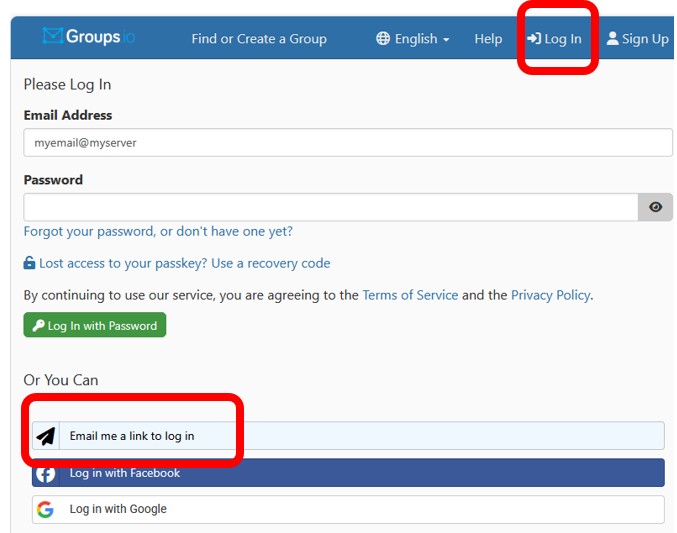
While using the the groups.io website is optional, you can login to your groups.io account to manage many groups.io settings:
- set display and security preferences for your account
- add a Display Name and other personal information to your profile
- visit all of the email groups to which you subscribe
- set email delivery preferences for each different group
Email Delivery Options
The Subscription -> Settings screen on the group’s page lists the options, so just select the one you’d prefer. The default is “Individual Messages” when you first subscribe.

Learn to Filter your Email
With all these email groups available, you may want to filter some of them out of your INBOX and into other folders and subfolders for viewing.
Visit the “Filter Email for Gmail Users” page for instructions to establish the filters for your gmail.com account.
Visit “Filter Email for Thunderbird Users” to learn about the Thunderbird email tool and how to create and manage filters for all your email providers.
Instructions for other email tools are in the works!
Create a New Email Group
If you would like to have an email group on RWV.groups.io for your resident club or group, or you think you’d like to organize a topical email discussion group for residents, then visit RWV Email Groups.
Last updated 8/15/26